
Series 2A wired up the full OAuth 2.1 stack: discovery endpoints, mock Dynamic Client Registration, JWT validation, bearer token forwarding. Every piece of it works — right up until Claude Code opens the browser to log in, and OpenIddict slams the door:
error: invalid_request
error_description: The specified 'redirect_uri' is not valid for this client application.
This post is about the one component that fixes it — a single bridge middleware — and why it earns its own post: it is the piece nobody else builds, because almost everyone tests their MCP OAuth against a client that never triggers the problem.
This is also the local-machine post: everything that stands between “the OAuth architecture is correct” (Series 2A) and “Claude Code on my laptop is actually connected as me” lives here.
- Why Claude’s random localhost ports break redirect URI validation — and why no off-the-shelf option works
- The bridge middleware: four steps that map an unpredictable local port to a fixed registered URI
- The security analysis: what the middleware relaxes, the attack the URI check prevents, and why dev-only is not the whole answer
- Why Node.js rejects your dev certificate — and the HTTP-in-development setup that sidesteps it
- A field guide to every error in the flow, in the order you’ll meet them — and why a working reference implementation can still fail you
- The full authentication flow, end to end
- The payoff: when the client that calls your tools can also read your code, it becomes the debugger
Real-world note — use Claude Code CLI, not Claude Desktop. Everything in this post was developed against the CLI, and not by preference at first: Claude Desktop cannot connect to an MCP server running on localhost — only the CLI can. Before I understood that, I tried tunneling the local server through ngrok so Desktop could reach it; it worked, but the tunnel URL changed on every restart and dragged the OAuth redirect configuration along with it. The setup that stuck is the one in this post: bridge middleware + Claude Code CLI. Side note — I got so fond of the CLI along the way that I never opened Claude Desktop again.
The Localhost Port Problem
OAuth’s redirect rule is like a bank that will only mail your new card to an address you registered in advance. Claude Code, meanwhile, moves to a new address every single day. Neither side will budge — that is the whole problem, and it is where I spent the most debugging time.
Concretely: Claude CLI and Claude Code pick a random local port for their OAuth callback. The redirect URI in the authorization request looks like http://localhost:39616/callback — where 39616 is chosen the moment the flow starts; next time it might be 52041. And OpenIddict (with the OAuth spec behind it) requires every redirect URI to be pre-registered, rejecting anything that does not match exactly. That strictness is a security feature — it prevents an attacker from hijacking the authorization code by sending it to a URI they control.
The naive solutions all have problems:
- Pre-register a long list of localhost ports — impractical, and OpenIddict would need to support wildcard matching, which it intentionally does not.
- Use a wildcard redirect URI — a direct security hole. Any process on the machine could claim to be the redirect target.
- Patch Claude’s SDK — not possible; it is Anthropic’s code.
Worth naming the elephant: most people never hit this problem, because they test their OAuth against MCP Inspector, which listens on a fixed, known port — pre-register http://localhost:6274/oauth/callback and you are done. The Inspector proves your protocol. Only Claude proves your product — and Claude brings random ports.
The solution I built is a bridge middleware that sits in front of OpenIddict on the identity server.
The Bridge Middleware Solution
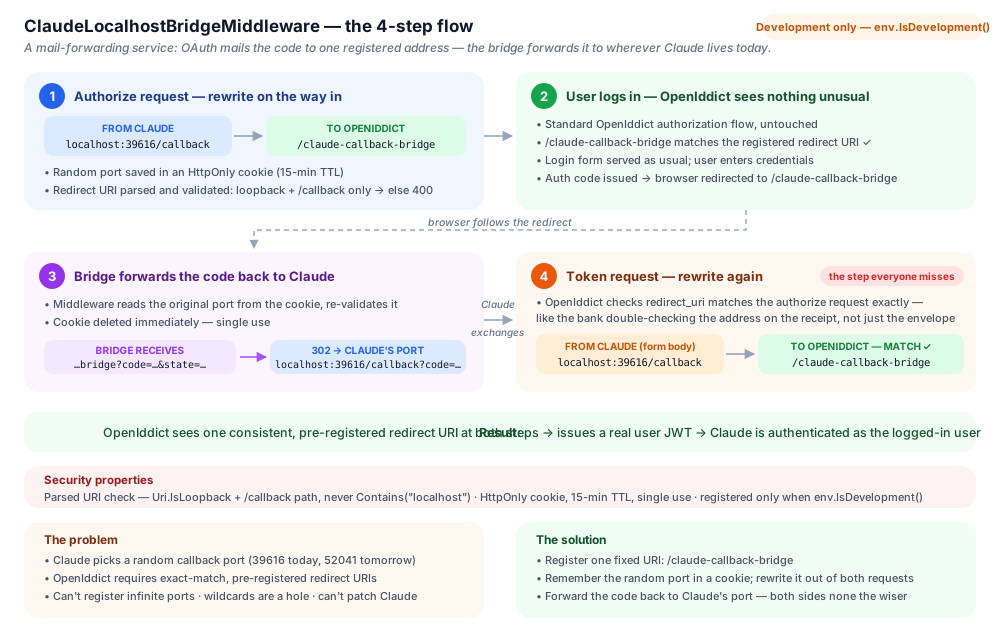
The fix is a mail-forwarding service. The bank sends the card to one fixed, registered address — the bridge — and the forwarding service remembers where Claude actually lives today and passes it on. In code: ClaudeLocalhostBridgeMiddleware runs before OpenIddict processes any request, transparently rewriting the redirect URI in both the authorization request and the subsequent token request, so OpenIddict sees a fixed, pre-registered URI at both steps. Neither side ever knows the forwarding happened.
The one pre-registered redirect URI on the Claude client is the bridge itself:
RedirectUris = { new Uri("https://your-identity-server/claude-callback-bridge") }
The flow has four steps:
Step 1 — Intercept the authorization request. When Claude sends GET /connect/authorize?client_id=MyApp_Claude&redirect_uri=http://localhost:39616/callback&..., the middleware saves that random URI in an HttpOnly cookie with a 15-minute TTL, then rewrites the query string so OpenIddict sees redirect_uri=https://identity-server/claude-callback-bridge — the URI that is pre-registered.
if (context.Request.Path.StartsWithSegments("/connect/authorize"))
{
    var clientId = context.Request.Query["client_id"].ToString();
    var redirectUri = context.Request.Query["redirect_uri"].ToString();

    if (clientId == "MyApp_Claude" && redirectUri != bridgeUri)
    {
        // Validate: loopback callbacks only. PARSE the URI — never substring-match.
        // A Contains("localhost") check also accepts https://localhost.evil.com/callback,
        // letting a crafted authorize link exfiltrate the authorization code.
        if (!(Uri.TryCreate(redirectUri, UriKind.Absolute, out var uri)
              && uri.IsLoopback
              && (uri.Scheme == Uri.UriSchemeHttp || uri.Scheme == Uri.UriSchemeHttps)
              && uri.AbsolutePath == "/callback"))
        {
            context.Response.StatusCode = 400;
            await context.Response.WriteAsync("Only localhost callbacks allowed.");
            return;
        }

        // Save the random port for later
        context.Response.Cookies.Append("ClaudeOriginalRedirectUri", redirectUri, new CookieOptions
        {
            HttpOnly = true,
            Secure = context.Request.IsHttps,
            // The browser returns to /claude-callback-bridge via a redirect chain that can
            // be treated as cross-site — Strict would drop the cookie. None (with Secure)
            // over HTTPS, Lax otherwise.
            SameSite = context.Request.IsHttps ? SameSiteMode.None : SameSiteMode.Lax,
            Expires = DateTimeOffset.UtcNow.AddMinutes(15),
            Path = "/"
        });

        // Rewrite the query string
        var items = QueryHelpers.ParseQuery(context.Request.QueryString.Value)
                                .ToDictionary(k => k.Key, v => v.Value.ToString());
        items["redirect_uri"] = bridgeUri;
        context.Request.QueryString = new QueryString(QueryHelpers.AddQueryString("", items));
    }
}
Step 2 — User logs in normally. OpenIddict processes the authorization request, presents the login form, and issues an authorization code. The code is sent to /claude-callback-bridge — the registered URI.
Step 3 — Bridge endpoint redirects back to Claude. The middleware intercepts the request to /claude-callback-bridge, reads the original URI from the cookie, appends the code and state parameters, and redirects the browser to http://localhost:39616/callback?code=...&state=.... Claude’s local listener receives the code exactly as if it had been sent directly.
if (context.Request.Path.StartsWithSegments("/claude-callback-bridge"))
{
    if (context.Request.Cookies.TryGetValue("ClaudeOriginalRedirectUri", out var originalUri))
    {
        var uriBuilder = new UriBuilder(originalUri);
        var qs = context.Request.QueryString.Value?.TrimStart('?') ?? "";
        uriBuilder.Query = qs;

        context.Response.Cookies.Delete("ClaudeOriginalRedirectUri");
        context.Response.Redirect(uriBuilder.Uri.AbsoluteUri);
        return;
    }

    context.Response.StatusCode = 400;
    await context.Response.WriteAsync("Session expired. Please try again.");
    return;
}
Step 4 — Rewrite the token request. This is the step I missed on the first pass, and it caused an hours-long debugging session. In the mail-forwarding picture: the bank double-checks the delivery address written on the receipt — so the forwarder has to fix the receipt too, not just the envelope. When Claude exchanges the authorization code for a token, it sends POST /connect/token with redirect_uri=http://localhost:39616/callback in the form body, and OpenIddict validates that it exactly matches the authorization request — which we rewrote to /claude-callback-bridge. The middleware must rewrite the form data here too:
if (context.Request.Path.StartsWithSegments("/connect/token") &&
    context.Request.Method == "POST" && context.Request.HasFormContentType)
{
    var clientId = context.Request.Form["client_id"].ToString();
    var redirectUri = context.Request.Form["redirect_uri"].ToString();

    if (clientId == "MyApp_Claude" && redirectUri != bridgeUri)
    {
        var formValues = context.Request.Form
            .ToDictionary(k => k.Key,
                v => v.Key == "redirect_uri"
                    ? new StringValues(bridgeUri)
                    : v.Value);

        context.Request.Form = new FormCollection(formValues);
    }
}
After this rewrite, OpenIddict validates successfully and issues the token. Claude now has a real JWT for the authenticated user.
Security Considerations
The redirect URI validation is the load-bearing wall here, and it must be a parsed check: Uri.IsLoopback plus an exact /callback path. The tempting shortcut — redirectUri.Contains("localhost") — is an authorization-code exfiltration hole: https://localhost.evil.com/callback contains “localhost” too, and PKCE does not save you because the attacker who crafted the authorize link owns the code verifier. Beyond that: the cookie is HttpOnly (JavaScript cannot read it), has a 15-minute expiry, and is deleted immediately after use.
Note that env.IsDevelopment() alone would not close that hole. The dev-only guard controls where the middleware runs, not who can exploit it while it runs — the exfiltration attack executes entirely in the developer’s own browser against their own localhost identity server, with the code leaving over a normal outbound request. The parsed URI check is what stops it; the environment check just keeps the blast radius small.
Be honest about what this middleware is: a deliberate relaxation of OAuth’s exact-match rule, scoped to loopback — the same allowance RFC 8252 §7.3 grants native apps, which OpenIddict simply doesn’t implement. That’s why the registration is wrapped in if (env.IsDevelopment()): production clients use registered domains (claude.ai’s fixed callback URIs, pre-registered on the same client) and the bridge never loads.
Node.js vs Your Self-Signed Certificate
One failure mode has nothing to do with OAuth and everything to do with the runtime Claude Code is built on:
Failed to reconnect: UNABLE_TO_VERIFY_LEAF_SIGNATURE
SDK auth failed: unable to verify the first certificate
The MCP endpoint is plain HTTP — but the discovery metadata hands Claude https://localhost:... URLs served with ASP.NET Core’s self-signed dev certificate, and Node.js does not use the OS certificate store. dotnet dev-certs https --trust fixes browsers and .NET clients; it does nothing for Node, and even NODE_EXTRA_CA_CERTS did not cover Claude Code’s MCP auth fetch path in my testing. The fix that actually works: take TLS out of the picture and serve the OAuth endpoints over plain HTTP on a second port, in development only.
Bind an HTTP endpoint on the identity server alongside the HTTPS one — in
launchSettings.json:"applicationUrl": "https://localhost:44386;http://localhost:44385"Let OpenIddict accept HTTP (it refuses by default — rightly). In ABP this is one flag in
appsettings.Development.json("AuthServer": { "RequireHttpsMetadata": false }), which the host translates into:Configure<OpenIddictServerAspNetCoreOptions>(options => { options.DisableTransportSecurityRequirement = true; });Register the HTTP bridge redirect URI for the Claude client (
http://localhost:44385/claude-callback-bridge) — the bridge middleware builds its rewrite target from the request’s own scheme and host, so the seeded URI must match.Point the MCP server’s
IdentityServerUrlat the HTTP port. Now every URL in the discovery documents ishttp://and Node never has to evaluate a certificate. TheApiUrlstays HTTPS — only .NET calls that, and .NET trusts the dev cert.
Everything HTTP here is Development-only, same as the bridge middleware: production uses a real certificate from a real CA, which Node trusts out of the box, and none of this applies.
Real-world note. Claude Code only lists your server if a .mcp.json exists at the root of the directory you launched it from (see Series 1). Mine vanished during a repo restructure and the server silently disappeared from /mcp — no error, just absence. If the server is missing from the list rather than failing, that file is what’s missing.
Debugging the Flow: Every Error in the Order You’ll Meet It
One lesson deserves its own section: Claude Code’s OAuth client gets stricter with every release. Re-running this architecture months after it was first built surfaced a chain of spec-compliance requirements — the resource field, AS-side DCR advertisement, response schema validation — that the original client never checked. A working reference implementation proves what the client of its era accepted; assume the client has moved since.
Read the errors productively: each one means you got one layer deeper. In the order you will meet them:
| Error | Where | Actual cause | Fix |
|---|---|---|---|
Server missing from /mcp entirely | Claude Code | No .mcp.json at the directory you launched claude from | Create it (Series 1) |
Unable to connect. Is the computer able to access the url? | Claude Code | Nothing listening — server not started, or a zombie process holds the port with no listener | Check with curl, kill stale processes |
Failed to bind ... address already in use | MCP server | Another instance (often a forgotten background one) owns the port | taskkill, restart |
UNABLE_TO_VERIFY_LEAF_SIGNATURE / unable to verify the first certificate | Claude Code | Node.js rejects the self-signed dev cert on the HTTPS identity server URLs in your metadata | Serve OAuth over HTTP in dev (see above) |
The socket connection was closed unexpectedly | Claude Code | Discovery URLs point at a host/port that is not running (e.g. the new HTTP port before a restart) | Start/restart the identity server, verify each URL with curl |
Protected resource http://... does not match expected .../mcp | Claude Code | resource in your RFC 9728 metadata isn’t the MCP server’s own URL | Return {selfUrl}/mcp as resource (Series 2A) |
Incompatible auth server: does not support dynamic client registration | Claude Code | registration_endpoint missing from the authorization server’s discovery document | Inject it via OpenIddict’s configuration-request event (Series 2A) |
invalid_type ... path: ["client_secret"] ... received null | Claude Code | Mock DCR response returns client_secret: null — schema validation demands string-or-absent | Omit the field for public clients (Series 2A) |
error: invalid_target (ID2190) | OpenIddict, in the browser | Claude’s RFC 8707 resource parameter isn’t in the server’s code-registered resource list (DB scope resources don’t count) | RegisterResources(mcpUrl) + IgnoreResourcePermissions() (Series 2A) |
redirect_uri mismatch | OpenIddict | Random localhost port vs. pre-registered URIs | The bridge middleware (see above) |
Bare WWW-Authenticate: Bearer on the 401 | MCP server | Middleware registered after UseAuthorization, or an “add if missing” condition that never fires | Register before the auth middlewares; check for resource_metadata instead (Series 2A) |
Every row is an error I actually hit. The ordering logic holds even if your sequence differs: connectivity → TLS → metadata → registration → authorization → redirect. Fix them front to back.
Testing the Full Flow
With the bridge in place, the pieces from Series 2A finally connect end to end:
$ claude
⠼ Connecting to MCP server...
→ GET /mcp → 401 Unauthorized
→ GET /.well-known/oauth-protected-resource
→ GET /.well-known/openid-configuration
→ POST /connect/register
→ Opening browser for authentication...

[Browser opens, user logs in to the identity server]

→ GET /claude-callback-bridge?code=...&state=...
→ Redirect to http://localhost:52041/callback?code=...&state=...
→ POST /connect/token
✓ Authenticated as user@example.com
✓ Connected to the MCP server
Claude then has a JWT for the authenticated user. Every tool call Claude makes on that session runs with that user’s exact permissions. If a tool queries reservations, it gets only that user’s tenant’s reservations. If a tool tries to create a record, the audit log shows the real user’s ID. The service account is never involved.
The Payoff: The Client Is Also the Debugger
Most people test their MCP OAuth against MCP Inspector — a cooperative client with a fixed callback port, so none of the bridge work is needed. I built the bridge so that real Claude Code could connect instead, and that turned out to be the highest-leverage decision in the whole series.
Here is why. Claude Code runs inside the same repository as the MCP server’s source code. So when a tool call fails, the client that hit the error is an agent with the full codebase in context — it reads the tool’s source, greps the server logs, and points at the cause: “the DTO field is nullable but the mapper assumes a value.” No copying stack traces between windows, no reproduction steps. The error and its diagnosis happen in the same conversation.
That collapses the entire tool-delivery loop into one place: write the tool with Claude, connect, call it, watch it fail, let Claude find the bug, fix, call again. Two compounding effects:
- Tool descriptions get tested by their real consumer. The Inspector can never tell you whether an LLM will understand your
[Description]text. Claude tells you immediately — by misusing the tool — and can articulate how it misread the description and what wording would have worked. - Every debug call runs under the real security model. Because of the bearer token forwarding from Series 2A, each iteration exercised actual permissions and tenant scoping — so the tools that shipped fast were also correct under the production auth model, not a service-account approximation that breaks on first contact with a real user.
The bridge doesn’t just let Claude authenticate. It turns Claude into a member of your dev team who can both use and repair the tools you are building.
References
- RFC 8252 — OAuth 2.0 for Native Apps — §7.3’s loopback-redirect allowance, the spec basis for what the bridge middleware does
- RFC 6749 — The OAuth 2.0 Authorization Framework — §3.1.2’s redirect endpoint registration requirement, the rule the bridge reconciles Claude with
Next in this series
Model Context Protocol Series 3 — Enhancing Your MCP Server: Tool Explorer UI, Grouping, and Write Safety
Authentication is done. Series 3 adds a Swagger-like tool explorer, verb and domain grouping, two-step write confirmation, idempotency, and a full audit trail.
Read next →Building an MVP or SaaS?
I help startups ship production-ready products with .NET, PostgreSQL, Angular/React, and AI integrations like Model Context Protocol (MCP).