Series 1 ended with a working MCP server — but every tool call it made to the backend used a service account with admin access and no tenant context. Which means Claude could, in theory, pull data from any tenant in the system. No audit trail. No permission boundaries. Just a skeleton key with your API’s address on it.
That’s not a security model. That’s a liability.
This post replaces the service account with OAuth 2.1 bearer token forwarding — so Claude authenticates as the real logged-in user, inherits their exact permissions, and every action it takes is stamped with their identity. It is part A of a pair: everything here is the OAuth architecture itself; the local-machine setup — Claude’s random callback ports, the bridge middleware, the Node.js certificate problem, and the full debugging field guide — is Series 2B. Here’s what part A covers:
- Why a service account is the wrong design — and what bearer token forwarding gives you instead
- The two-client design: PKCE for Claude Code, client credentials for scripts and CI
- The OAuth discovery chain Claude follows automatically before it ever prompts you to log in
- A mock DCR endpoint that returns your pre-registered client without touching the database
- JWT Bearer validation on the MCP server and the one dev-only config that must not reach production
- The delegating handler that re-attaches the user JWT to every outgoing backend call
- Disabling ABP’s default service account so it does not silently overwrite your forwarded token
Why Not a Service Account
The short answer: a service account has no tenant context and too many permissions.
In our system, the platform is multi-tenant — every API endpoint scopes its results to the requesting user’s tenant. If the MCP server authenticates with a service account, it bypasses all of that. A tool that fetches reservations could accidentally expose data from any tenant. There is no audit trail tying actions to a specific user. And if that service account credential is ever compromised, the blast radius is the entire platform.
The right pattern is called bearer token forwarding. When a user authenticates with Claude, the MCP server receives their JWT as a Bearer token on every incoming request. Every outgoing call to the backend API re-uses that same token. The backend sees a normal authenticated user request — the MCP server is just a transparent intermediary. The user can only see what they could see if they logged in directly.
This is also the correct audit story. The change log, the activity stream, every modified entity — they are all stamped with the real user’s identity.
The Two-Client Design
Before wiring up OAuth, you need to decide which clients OpenIddict will know about. I settled on two distinct clients for different use cases.
What is PKCE?
In plain terms: PKCE (say “pixy”) is a way to prove that the app asking to exchange a login code for an access token is the same app that started the login in the first place — without needing a secret password baked into the app itself.
That matters because Claude Code and Claude Desktop run on your own laptop. Anything embedded in that app — a password, a secret key — could be dug out of it. So instead of a fixed secret, PKCE has the app generate a one-time secret for each login attempt, keep half of it hidden, and show OpenIddict only a scrambled version up front. At the very end, it reveals the original — and only the app that started the flow could possibly have it.
Why use it: the standard OAuth flow assumes the app has a secret only it knows, baked in at registration time, and shown once when exchanging the code for a token. That works fine for a server you control, where the secret sits in a config file nobody outside your team can read. It falls apart for an app installed on someone else’s machine — decompile it, inspect its traffic, or read its config, and the “secret” is right there for anyone to reuse. Worse, the redirect step in OAuth (the browser bouncing back to the app with a code in the URL) is exposed to anything else on the same machine that’s watching for it — another app, a malicious browser extension, a proxy. Without PKCE, whoever grabs that code first can trade it for a token themselves. PKCE closes that gap by making the code alone useless: it’s only redeemable together with a one-time value that never left the device until the very last step, and only the app that generated it has that value.
With an example:
- Claude is about to send you to the login page. First, it makes up a random string, e.g.
verifier = "x8fH2...". This never leaves your machine yet. - It scrambles that string with a one-way hash:
challenge = SHA256(verifier). A hash can’t be reversed — you can turnverifierintochallenge, but notchallengeback intoverifier. - Claude sends you to
/connect/authorize?...&code_challenge=challenge— only the scrambled version travels over the network. You log in normally. - OpenIddict redirects back with a short-lived
code. It also remembers whichchallengewas paired with that code. - Claude calls
/connect/tokenwith both thecodeand the originalverifier(never sent before now). - OpenIddict hashes the
verifierit just received and checks: does it match thechallengefrom step 3? If yes, it’s provably the same app that started the flow, so it hands back the access token.
If an attacker intercepted the authorization code in step 4 (say, by snooping the redirect), it’s useless to them — they don’t have the verifier, and they can’t fake it because they never saw it in the first place.
MyApp_Claude is a public client — no secret, PKCE required. This is the client used by Claude Desktop and Claude Code. Because these are installed on a developer’s local machine, there is no safe place to store a client secret. PKCE (Proof Key for Code Exchange) fills that role: each authorization request generates a random code verifier, which is hashed and sent with the initial request, then verified at token exchange. Even if someone intercepts the authorization code, they cannot exchange it without the original verifier.
MyApp_MCP is a confidential client using client_credentials. This is for scripts, Postman, background jobs, or CI pipelines that need to call the MCP server without a browser-based login flow. It has a secret and is appropriate where that secret can be stored safely.
In OpenIddict, registering the public client looks roughly like this:
await manager.CreateAsync(new OpenIddictApplicationDescriptor
{
    ClientId = "MyApp_Claude",
    ClientType = OpenIddictConstants.ClientTypes.Public,
    ConsentType = OpenIddictConstants.ConsentTypes.Implicit,
    RedirectUris = { new Uri("https://your-identity-server/claude-callback-bridge") },
    Permissions =
    {
        Permissions.Endpoints.Authorization,
        Permissions.Endpoints.Token,
        Permissions.GrantTypes.AuthorizationCode,
        Permissions.GrantTypes.RefreshToken,
        Permissions.ResponseTypes.Code,
        Permissions.Scopes.OpenId,
        Permissions.Scopes.Email,
        Permissions.Scopes.Profile,
        Permissions.Scopes.OfflineAccess,
        Permissions.Prefixes.Scope + "api",
    }
});
Notice the RedirectUri is /claude-callback-bridge on the identity server — not a localhost port. That URI is the anchor for the bridge middleware that reconciles Claude’s random callback ports with OpenIddict’s exact-match rule — the subject of Series 2B.
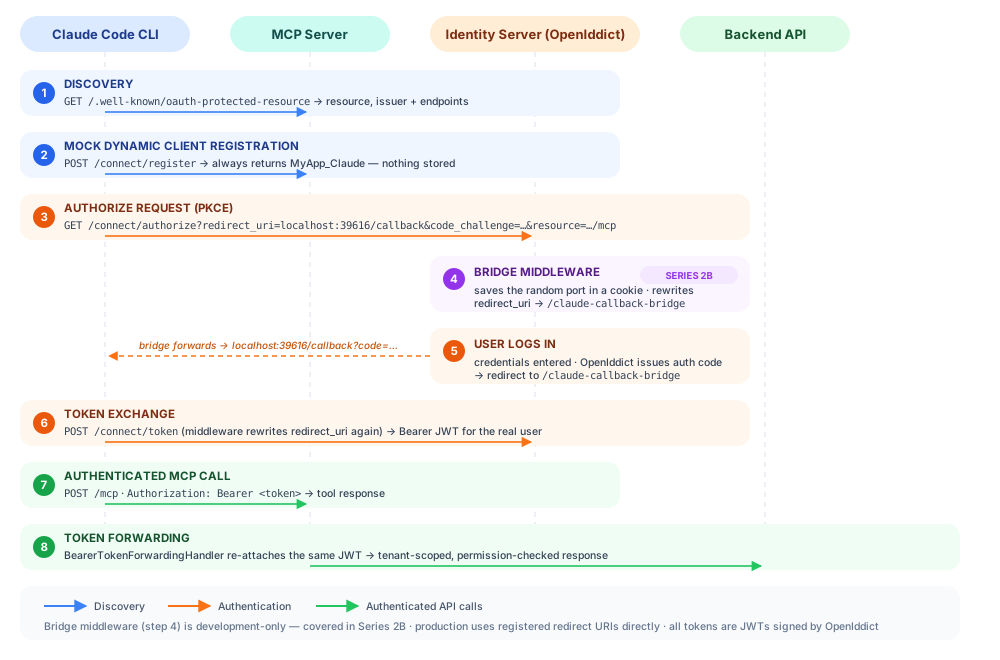
OAuth Discovery Endpoints
Claude arrives at your server knowing nothing — no login page URL, no client id, nothing. Discovery is the paper trail it follows to teach itself: each well-known document names the next stop, and every stop is validated, so one wrong field anywhere stops the chain cold. The documents are specified in RFC 8414 and RFC 9728, and they live on the MCP server, not on the identity server itself.
The flow is:
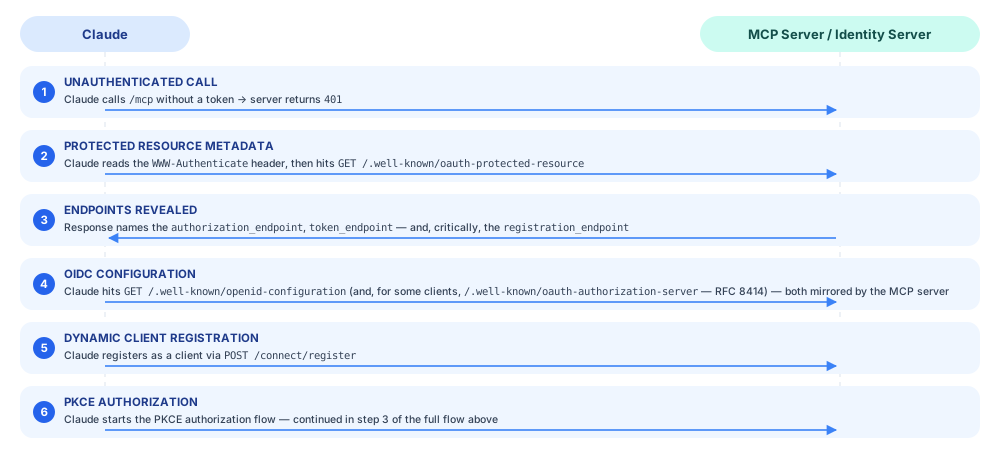
Step 2 only works if the 401 actually carries the pointer. ASP.NET Core’s JWT Bearer handler emits a bare WWW-Authenticate: Bearer — it does not know about RFC 9728 resource metadata. A small response middleware adds it:
public class WwwAuthenticateMiddleware(RequestDelegate next, IConfiguration configuration)
{
    public async Task InvokeAsync(HttpContext context)
    {
        await next(context);

        if (context.Response.StatusCode == 401 && !context.Response.Headers.ContainsKey("WWW-Authenticate"))
        {
            var selfUrl = configuration["App:SelfUrl"]?.TrimEnd('/')
                ?? $"{context.Request.Scheme}://{context.Request.Host}";

            context.Response.Headers["WWW-Authenticate"] =
                $"Bearer realm=\"mcp\", resource_metadata=\"{selfUrl}/.well-known/oauth-protected-resource\"";
        }
    }
}
Without this, the 401 is a dead end and Claude never finds your authorization server.
Two wiring details that cost me a debugging round: register this middleware before UseAuthentication()/UseAuthorization() (authorization short-circuits on a failed challenge — anything after it never sees the 401), and check for resource_metadata rather than the header’s absence (the JWT challenge always sets a bare WWW-Authenticate: Bearer, so “add if missing” never fires).
The rest is spec-compliant auto-discovery, not magic. The MCP server exposes these endpoints, which point at the real identity server for all the actual OAuth work:
[HttpGet(".well-known/oauth-protected-resource")]
[AllowAnonymous]
public ActionResult<object> OAuthProtectedResource()
{
    var identityServer = _configuration["App:IdentityServerUrl"].TrimEnd('/');

    var selfUrl = _configuration["App:SelfUrl"].TrimEnd('/');

    return Ok(new
    {
        // RFC 9728: `resource` identifies THIS protected resource — the MCP server.
        // Claude validates it against the /mcp URL it connected to; returning the
        // identity server here fails with:
        //   "Protected resource http://... does not match expected .../mcp (or origin)"
        resource = selfUrl + "/mcp",
        authorization_servers = new[] { identityServer },
        authorization_endpoint = identityServer + "/connect/authorize",
        token_endpoint = identityServer + "/connect/token",
        registration_endpoint = selfUrl + "/connect/register",
        jwks_uri = identityServer + "/.well-known/jwks",
        scopes_supported = new[] { "openid", "offline_access", "email", "profile", "api" },
        code_challenge_methods_supported = new[] { "S256" }
    });
}
Two fields deserve attention. resource must be the MCP server’s own URL — recent Claude Code versions validate it strictly against the endpoint they connected to. And the registration_endpoint intentionally points back to the MCP server, not to the identity server. That is where the mock DCR lives.
The Mock DCR Endpoint
RFC 7591 defines Dynamic Client Registration — a way for OAuth clients to register themselves on-the-fly with a server they have never talked to before. Claude’s SDK implements this. When Claude sees a registration_endpoint, it will POST to it with a JSON body describing itself before starting any authorization flow.
I do not want to expose a real DCR endpoint. Real DCR would create a new client entry in the database on every connection, which is a maintenance and security headache. The solution is a fake endpoint that always returns the pre-registered MyApp_Claude client credentials, regardless of what was sent:
[HttpPost("connect/register")]
[AllowAnonymous]
public ActionResult<object> RegisterClient([FromBody] Dictionary<string, object> request)
{
    // Always return the pre-registered public client.
    // We do not actually register anything — we just echo back the right client_id.
    return Ok(new
    {
        client_id = "MyApp_Claude",
        redirect_uris = request?.TryGetValue("redirect_uris", out var r) == true
            ? r
            : new[] { "http://localhost:40383/callback" },
        grant_types = new[] { "authorization_code", "refresh_token" },
        response_types = new[] { "code" },
        token_endpoint_auth_method = "none",
        application_type = "native",
        client_name = "Claude AI Connector",
        client_id_issued_at = DateTimeOffset.UtcNow.ToUnixTimeSeconds()
    });
}
Claude gets back what it expects — a client_id and a confirmation of its redirect URIs — and proceeds with the authorization flow using MyApp_Claude as its client identity. We get a static, auditable client registration with no moving parts.
One shape requirement: Claude’s SDK schema-validates this response. "client_secret": null — the natural C# instinct for a public client — fails the whole flow:
SDK auth failed: [{ "expected": "string", "code": "invalid_type",
                    "path": ["client_secret"], "message": "Invalid input: expected string, received null" }]
Omit the field entirely for a public PKCE client.
The authorization server must advertise DCR too
Older Claude clients read the registration_endpoint from the protected-resource metadata and moved on. Current Claude Code does strict RFC 8414 discovery: it fetches the identity server’s own metadata and checks for DCR support there. OpenIddict does not implement DCR, so Claude fails with:
SDK auth failed: Incompatible auth server: does not support dynamic client registration
The fix: inject the field into OpenIddict’s configuration document with an event handler, pointing at the mock DCR on the MCP server (the value is just a URL — it can live anywhere):
PreConfigure<OpenIddictServerBuilder>(serverBuilder =>
{
    serverBuilder.AddEventHandler<OpenIddictServerEvents.HandleConfigurationRequestContext>(b =>
        b.UseInlineHandler(context =>
        {
            context.Metadata["registration_endpoint"] =
                "http://localhost:5010/connect/register";   // from configuration, dev-only
            return default;
        }));
});
OpenIddict server settings Claude needs
A few switches on the OpenIddict server itself round out the Claude support:
// DCR requests arrive before a client_id exists — without this, OpenIddict
// rejects them outright. Safe here: our /connect/register never creates
// clients, it always maps back to the pre-registered MyApp_Claude.
options.AcceptAnonymousClients();

// Stateless authorization codes. With storage enabled, a stale or replayed
// code from Claude's retry behaviour surfaces as a confusing invalid_grant.
options.DisableAuthorizationStorage();
And two configuration-level details: add https://claude.ai and https://app.claude.ai to the identity server’s CORS origins, and pre-register Claude’s hosted callback URIs (https://claude.ai/api/mcp/auth_callback, https://app.claude.ai/api/mcp/auth_callback) as redirect URIs on the client — that is what makes the same client work from claude.ai’s web connectors, not just the local CLI.
Register the MCP server as an OpenIddict resource (RFC 8707)
When Claude asks for a token, it also names the door the token should open — &resource=http://localhost:5010/mcp (RFC 8707, echoed from your protected-resource metadata) — so the token gets audience-scoped to your MCP server. Correct behaviour. But OpenIddict refuses to mint keys for doors it has never heard of, and the list of doors it knows lives in code, not your database. OpenIddict (7.x) rejects the request:
error: invalid_target
error_description: One of the specified 'resource' parameters is invalid.
error_uri: https://documentation.openiddict.com/errors/ID2190
Real-world note — save yourself my detour. My first theory was the database: OpenIddict scopes have a Resources collection, so I added the MCP URL there, reseeded, restarted — still invalid_target. DB scope resources only shape which audiences land in the token. Validation runs against Options.Resources plus per-client resource permissions, both registered in code.
The fix is two lines on the server builder:
PreConfigure<OpenIddictServerBuilder>(serverBuilder =>
{
    // 1. Whitelist the MCP server as a valid RFC 8707 resource (server-wide).
    //    Must be an absolute URI, and must match the metadata `resource` field verbatim.
    serverBuilder.RegisterResources("http://localhost:5010/mcp");   // from configuration

    // 2. OpenIddict ALSO enforces per-client resource permissions ("rsrc:..." entries
    //    on the application). Pre-seeded clients don't have them, so either add the
    //    permission to each client — or skip that layer. Scope permissions still apply.
    serverBuilder.IgnoreResourcePermissions();
});
Both switches matter: RegisterResources alone still fails, because the client application has no rsrc:... permission entry. IgnoreResourcePermissions() skips that per-client layer while keeping scope enforcement — the same approach the ABP team’s MCP authentication article uses. Keep the scope-resource DB entry too if you want the API’s audience in the token alongside the MCP URL (aud is a set — validation on both servers keeps passing). And if you do touch scope seeding in ABP: the base helper only creates missing scopes (call ScopeManager.UpdateAsync for existing ones), and OpenIddict caches scopes in memory, so reseeding needs a restart.
JWT Bearer Authentication on the MCP Server
On the MCP server side, every request to /mcp requires a valid JWT from the identity server. The configuration is standard ASP.NET Core JWT Bearer:
services.AddAuthentication("Bearer")
    .AddJwtBearer("Bearer", options =>
    {
        options.Authority = identityServerUrl.TrimEnd('/') + "/";
        options.RequireHttpsMetadata = !isLocalDevelopment;

        options.TokenValidationParameters = new TokenValidationParameters
        {
            ValidateIssuer = true,
            ValidateAudience = false,
            ValidateLifetime = true,
            ValidateIssuerSigningKey = true,
            ClockSkew = TimeSpan.FromSeconds(5)
        };

        // In local development, the identity server uses a dev certificate
        if (isLocalDevelopment)
        {
            options.BackchannelHttpHandler = new HttpClientHandler
            {
                ServerCertificateCustomValidationCallback =
                    HttpClientHandler.DangerousAcceptAnyServerCertificateValidator
            };
        }
    });
ValidateAudience = false is intentional here — our tokens do not include an aud claim scoped to the MCP server specifically. If yours do (ABP solutions typically stamp the API resource name, e.g. aud: "YourApp"), validate it: ValidateAudience = true, ValidAudience = "YourApp".
Registering the handler is not enough on its own — nothing is protected until the /mcp endpoint demands it. That takes a named policy plus RequireAuthorization on the mapped endpoint:
services.AddAuthorization(options =>
{
    options.AddPolicy("Bearer", policy =>
    {
        policy.AddAuthenticationSchemes("Bearer");
        policy.RequireAuthenticatedUser();
    });
});
app.UseAuthentication();
app.UseAuthorization();

app.MapMcp("/mcp")
   .RequireAuthorization("Bearer");
Miss the RequireAuthorization call and everything appears to work — tokens validate when present — but anonymous requests sail straight through to your tools.
Bearer Token Forwarding
Think of the MCP server as a hotel concierge who never carries his own keycard: when you ask him to fetch something from your room, he swipes your card, so he can only open doors you could open yourself. That is bearer token forwarding — every outgoing call to the backend API carries the caller’s own JWT. BearerTokenForwardingHandler is a DelegatingHandler that sits in the HTTP client pipeline:
internal class BearerTokenForwardingHandler : DelegatingHandler
{
    private readonly IHttpContextAccessor _httpContextAccessor;

    protected override async Task<HttpResponseMessage> SendAsync(
        HttpRequestMessage request, CancellationToken cancellationToken)
    {
        var httpContext = _httpContextAccessor?.HttpContext;

        if (httpContext != null)
        {
            var authHeader = httpContext.Request.Headers["Authorization"].FirstOrDefault();

            if (!string.IsNullOrEmpty(authHeader) &&
                authHeader.StartsWith("Bearer ", StringComparison.OrdinalIgnoreCase))
            {
                var token = authHeader["Bearer ".Length..];
                request.Headers.Authorization =
                    new AuthenticationHeaderValue("Bearer", token);
            }
        }

        return await base.SendAsync(request, cancellationToken);
    }
}
The handler is registered globally so it applies to every HTTP client the server creates — including the ABP-generated proxies that call backend API endpoints:
services.ConfigureHttpClientDefaults(builder =>
{
    builder.AddHttpMessageHandler<BearerTokenForwardingHandler>();
});
One caveat that will bite you in stateful mode: when the MCP SDK runs stateful sessions (the WithHttpTransport default), tool calls execute inside async session continuations where IHttpContextAccessor.HttpContext is null — the handler above silently sends unauthenticated requests. The fix is an AsyncLocal<string?> holder (McpBearerTokenContext): a small middleware captures the bearer token on each POST /mcp before the SDK dispatches, and the handler falls back to it when HttpContext is null. AsyncLocal values set before dispatch propagate through the SDK’s continuations even though the request context does not.
There is also an X-Modification-Source header forwarded alongside the token. The backend API middleware reads that header to stamp any created or modified entities with "MCP" as the modification source. This gives you an audit trail that distinguishes changes made through Claude from changes made through the regular web UI — useful when you are debugging an unexpected mutation and want to know how it happened.
Disabling the Service Account
One important detail: if your solution’s HttpApi.Client module (or anything it depends on) wires up AbpHttpClientIdentityModelModule and configures an IdentityClients.Default — the common ABP pattern for console clients and background services — every outgoing proxy request authenticates with that password-grant service account. If you are forwarding user tokens, that configuration has to be disabled in the MCP server — otherwise ABP will overwrite your forwarded Bearer header with its own service account token. (If your client module never configures IdentityClients, there is nothing to disable — but the guard below is cheap insurance against someone adding it later.)
public override void PreConfigureServices(ServiceConfigurationContext context)
{
    // Disable ABP's default service account credential injection.
    // MCP uses bearer token forwarding instead.
    context.Services.PreConfigure<AbpIdentityClientOptions>(options =>
    {
        options.IdentityClients.Default = null;
    });
}
This must run in PreConfigureServices so it takes precedence over the module’s own configuration. I missed this on the first attempt and spent an afternoon wondering why the API was returning data for the wrong tenant.
What This Unlocks
A few things became immediately obvious once bearer token forwarding was working:
Multi-tenancy just works. The token carries the tenant claim, so every backend call respects tenant isolation with no extra plumbing.
Row-level security is free. Every permission check your API already enforces applies equally to Claude’s calls. Claude cannot see anything the user cannot see.
The audit log is honest. “Modified by sarah@example.com via MCP” instead of “modified by service-account” — and when something goes wrong, the traces show a real user you can log in as and reproduce with.
References
- Enabling MCP Authentication in ABP with OpenIddict — the ABP team’s take on the same problem; source of the
RegisterResources+IgnoreResourcePermissions()fix for RFC 8707 resource validation - RFC 9728 — OAuth 2.0 Protected Resource Metadata — the
/.well-known/oauth-protected-resourcedocument andresourcefield Claude validates - RFC 8414 — OAuth 2.0 Authorization Server Metadata — the discovery document Claude fetches from the identity server
- RFC 7591 — OAuth 2.0 Dynamic Client Registration — the registration protocol the mock DCR endpoint implements
- RFC 8707 — Resource Indicators for OAuth 2.0 — the
resourceparameter Claude sends with authorize and token requests - OpenIddict documentation — server events, resource validation, and error reference
Next in this series
Model Context Protocol Series 2B — The Bridge Middleware That Lets Claude Debug and Fix Its Own Tools
The architecture is in place — but Claude Code invents a new localhost callback port on every connection, and OpenIddict demands exact-match redirect URIs. Series 2B builds the bridge middleware that reconciles them, so the client that calls your tools can also read your code and debug them.
Read next →Building an MVP or SaaS?
I help startups ship production-ready products with .NET, PostgreSQL, Angular/React, and AI integrations like Model Context Protocol (MCP).