I was building a multi-tenant SaaS platform on ABP Framework and kept hitting the same wall: I wanted Claude to create tenants, query bookings, and manage configuration — not by generating code for me to run, but by calling the actual API directly. Like giving an AI assistant a real key to the backend, not a stack of printed instructions.
That’s exactly what MCP enables. But once I started digging, every tutorial I found showed stdio — a local process Claude spawns and kills. Runs on your machine, dies in your terminal, can’t be shared, can’t be deployed. A demo, not a product.
This post is about building a deployable MCP server in ASP.NET Core — not a stdio toy, but one wired into a real ABP Framework backend so Claude can call your actual application services. HTTP transport, ABP client proxies, structured logging, tests. Here’s what we’ll cover:
- Why Streamable HTTP is the right transport — and why stdio and SSE fall short
- Project layout: packages, project reference, and one common gotcha
- How ABP HTTP client proxies eliminate all
HttpClientboilerplate from your tools - The
Program.csstartup order that matters, with Serilog wired in - Structured logging with Serilog, configured from appsettings
- Writing a stateless tool and a tool backed by a real API call
- Testing tool classes in isolation with mocked service interfaces
- The
.mcp.jsonfile, connecting to Claude Code, and the common failure modes
The Three Transports
Before writing a line of code, it’s worth understanding what you’re actually choosing between — because the transport decision shapes everything from how you deploy to how Claude connects.
MCP defines three transports:
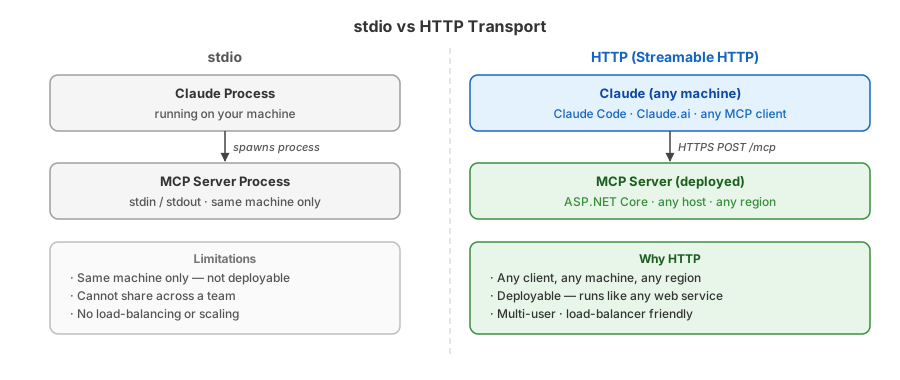
stdio — Claude spawns a local process and talks to it over stdin/stdout. Zero setup, but it’s fundamentally a local tool. You can’t put it behind a URL, you can’t share it across a team, and you can’t load-balance it. Fine for a proof of concept, not for anything real.
SSE (Server-Sent Events) — The original HTTP transport. Client sends requests via POST, server streams responses back over a persistent SSE connection. It works, but the long-lived connection is a headache behind most reverse proxies and load balancers. It was deprecated in the 2025-11-25 spec for good reason.
Streamable HTTP — The current standard. A single POST /mcp handles everything: the initialize handshake, tool calls, responses. Stateless, horizontally scalable, works behind any proxy. This is what MapMcp implements, and this is what we’re building.
Project Setup
Create a standard ASP.NET Core web project. Three NuGet packages and one project reference are all you need:
<ItemGroup>
  <PackageReference Include="ModelContextProtocol.AspNetCore" Version="0.3.*" />
  <PackageReference Include="Volo.Abp.Autofac" Version="10.4.1" />
  <PackageReference Include="Serilog.AspNetCore" Version="9.0.0" />
  <PackageReference Include="Serilog.Sinks.Async" Version="2.1.0" />
</ItemGroup>
<ItemGroup>
  <ProjectReference Include="..\YourApp.HttpApi.Client\YourApp.HttpApi.Client.csproj" />
</ItemGroup>
The project reference points to your solution’s existing HttpApi.Client module — the one that already knows how to talk to your API. The MCP server has no direct dependency on Volo.Abp.Http.Client; that lives in the client module where it belongs.
The full reference tree looks like this:
YourApp.McpServer
└── YourApp.HttpApi.Client
    ├── YourApp.Application.Contracts
    ├── YourApp.Application
    │   └── YourApp.Domain.Shared
    └── Volo.Abp.Http.Client          ← owns AddHttpClientProxies
The MCP server depends on exactly one project. Everything else — the contracts, the proxy infrastructure, the URL config — is pulled in transitively. Adding a new module’s contracts to HttpApi.Client automatically makes its interfaces available to the MCP server without touching McpServer.csproj.
Gotcha 1: if your repo has a shared
common.propsthat does not set<ImplicitUsings>, add<ImplicitUsings>enable</ImplicitUsings>explicitly in this project’s<PropertyGroup>. Without it,WebApplication,HttpContext, andRandomall fail to resolve with CS0103/CS0246.
Gotcha 2:
AddMcpServer()requires.WithHttpTransport()chained before any.WithTools<T>(). Without it,MapMcp()throwsInvalidOperationException: You must call WithHttpTransport()at startup — after ABP finishes initializing, which makes it easy to miss in the noise.
The ABP module declaration for the MCP server is minimal — no configuration needed here, since proxy registration lives in the client module:
[DependsOn(typeof(YourAppHttpApiClientModule))]
public class McpServerModule : AbpModule { }
ABP HTTP Client Proxies
This is the key feature that makes ABP-backed MCP tools clean to write.
ABP’s AddHttpClientProxies scans an Application.Contracts assembly at startup and generates a Castle DynamicProxy implementation for every IApplicationService interface it finds. These proxies are registered in the DI container. When a tool asks for IOrderAppService, it receives a proxy that serializes the call and POSTs to the real API — no HttpClient, no URL construction, no deserialization code in your tool.
The registration lives in your HttpApi.Client module, following ABP’s own convention (same pattern as AbpIdentityHttpApiClientModule, etc.):
[DependsOn(
    typeof(YourAppApplicationContractsModule),
    typeof(AbpHttpClientModule)
)]
public class YourAppHttpApiClientModule : AbpModule
{
    public override void ConfigureServices(ServiceConfigurationContext context)
    {
        var apiUrl = context.Services.GetConfiguration()["App:ApiUrl"]
                     ?? "https://localhost:44300";

        // Scans the contracts assembly and registers a proxy for every IApplicationService
        context.Services.AddHttpClientProxies(
            typeof(YourAppApplicationContractsModule).Assembly,
            remoteServiceName: "Default"
        );

        Configure<AbpRemoteServiceOptions>(options =>
        {
            options.RemoteServices.Default = new RemoteServiceConfiguration(apiUrl);
        });
    }
}
appsettings.json supplies the base URL the proxy uses for every outbound call:
{
  "App": {
    "SelfUrl": "http://localhost:5010",
    "ApiUrl": "https://localhost:44300",
    "IdentityServerUrl": "https://localhost:44300"
  }
}
With this in place, a tool class just declares a constructor parameter for whatever service interface it needs. ABP resolves it to the generated proxy at runtime.
Program.cs
using Serilog;

Log.Logger = new LoggerConfiguration()
    .WriteTo.Async(c => c.Console())
    .CreateBootstrapLogger();

try
{
    var builder = WebApplication.CreateBuilder(args);

    builder.Host
        .UseAutofac()                           // must be before AddApplicationAsync
        .UseSerilog((ctx, svc, cfg) =>
            cfg.ReadFrom.Configuration(ctx.Configuration)
               .ReadFrom.Services(svc));

    await builder.AddApplicationAsync<McpServerModule>();

    builder.Services.AddMcpServer()
        .WithHttpTransport()
        .WithTools<PingTools>()
        .WithTools<OrderTools>();

    builder.Services.AddCors(options =>
        options.AddDefaultPolicy(p =>
            p.AllowAnyOrigin().AllowAnyMethod().AllowAnyHeader()));

    var app = builder.Build();
    await app.InitializeApplicationAsync();     // must be before middleware

    app.UseCors();

    app.MapMcp("/mcp");
    await app.RunAsync();
}
catch (Exception ex)
{
    Log.Fatal(ex, "MCP server terminated unexpectedly");
}
finally
{
    Log.CloseAndFlush();
}
Two ordering rules are non-negotiable:
UseAutofac()beforeAddApplicationAsync— ABP wires services into Autofac’sContainerBuilderduring that call. If Autofac is not yet the factory, proxy registrations are lost silently.InitializeApplicationAsync()before any middleware — ABP’sOnApplicationInitializationhooks finalize the dynamic proxy registrations at this point.
Serilog
Serilog is configured entirely from appsettings.json — no sink code in Program.cs. The bootstrap logger (Console only) runs before the host is built, so startup exceptions are never silently swallowed.
"Serilog": {
  "MinimumLevel": {
    "Default": "Information",
    "Override": {
      "Microsoft": "Warning",
      "Microsoft.AspNetCore": "Warning",
      "System": "Warning"
    }
  },
  "WriteTo": [
    {
      "Name": "File",
      "Args": {
        "path": "Logs/log-.txt",
        "rollingInterval": "Day",
        "retainedFileCountLimit": 30,
        "outputTemplate": "{Timestamp:yyyy-MM-dd HH:mm:ss.fff zzz} [{Level:u3}] {Message:lj}{NewLine:l}{Exception}"
      }
    },
    {
      "Name": "Console",
      "Args": {
        "outputTemplate": "{Timestamp:yyyy-MM-dd HH:mm:ss.fff zzz} [{Level:u3}] {Message:lj}{NewLine:l}{Exception}"
      }
    }
  ],
  "Enrich": ["FromLogContext"]
}
ReadFrom.Services(svc) (the second call in UseSerilog) lets Serilog enrichers that are registered in DI — such as ABP’s correlation ID enricher — participate in the pipeline automatically.
Tools
A tool class gets [McpServerToolType]; each method gets [McpServerTool]. The [Description] text is what Claude reads at inference time to decide which tool to call and how to fill its arguments.
Stateless tool:
[McpServerToolType]
internal class PingTools
{
    [McpServerTool(ReadOnly = true)]
    [Description("Returns a random integer between min (inclusive) and max (exclusive).")]
    public int GetRandomNumber(
        [Description("Minimum value (inclusive)")] int min = 0,
        [Description("Maximum value (exclusive)")] int max = 100)
        => Random.Shared.Next(min, max);
}
ReadOnly = true tells Claude the tool has no side effects — it calls it without asking for confirmation.
Tool backed by an ABP application service:
[McpServerToolType]
internal class OrderTools
{
    private readonly IOrderAppService _orders;
    public OrderTools(IOrderAppService orders) => _orders = orders;

    [McpServerTool]
    [Description("Creates a new order in the system.")]
    public async Task<string> CreateOrder(
        [Description("Customer name")] string customerName,
        [Description("Product SKU")] string sku,
        [Description("Quantity")] int quantity)
    {
        var result = await _orders.CreateAsync(new CreateOrderDto
        {
            CustomerName = customerName,
            Sku = sku,
            Quantity = quantity
        });
        return $"Order #{result.OrderNumber} created for {customerName}.";
    }
}
IOrderAppService is resolved by ABP to the Castle DynamicProxy that was registered in AddHttpClientProxies. When CreateOrder runs, the proxy serializes the DTO and POSTs it to the API — no HttpClient code anywhere in the tool.
Tests
Tool classes are internal to keep them out of any public surface. Expose them to the test project with one line:
// AssemblyInfo.cs
[assembly: InternalsVisibleTo("YourApp.McpServer.Test")]
The test project needs only xUnit and NSubstitute — no ABP, no HttpClient, no running server:
<ItemGroup>
  <PackageReference Include="xunit" Version="2.9.3" />
  <PackageReference Include="Microsoft.NET.Test.Sdk" Version="17.14.1" />
  <PackageReference Include="xunit.runner.visualstudio" Version="2.8.2" />
  <PackageReference Include="NSubstitute" Version="5.3.0" />
</ItemGroup>
<ItemGroup>
  <ProjectReference Include="..\YourApp.McpServer\YourApp.McpServer.csproj" />
</ItemGroup>
Mock the service interface and assert on the return string:
public class OrderToolsTests
{
    private readonly IOrderAppService _orderService = Substitute.For<IOrderAppService>();
    private readonly OrderTools _sut;

    public OrderToolsTests() => _sut = new OrderTools(_orderService);

    [Fact]
    public async Task CreateOrder_CallsServiceAndReturnsConfirmation()
    {
        _orderService.CreateAsync(Arg.Any<CreateOrderDto>())
            .Returns(new OrderCreatedDto { OrderNumber = "ORD-001" });

        var result = await _sut.CreateOrder("Alice", "SKU-42", 3);

        Assert.Contains("ORD-001", result);
        await _orderService.Received(1).CreateAsync(Arg.Any<CreateOrderDto>());
    }
}
The tool’s logic — argument mapping, return string formatting, error handling — is fully testable without spinning up ABP or hitting a real API.
Connecting to Claude Code
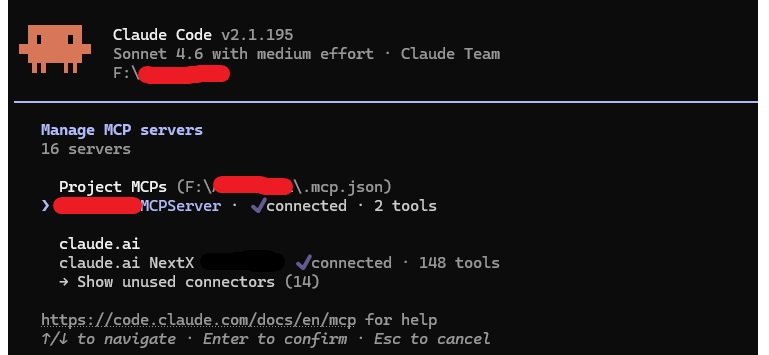
The .mcp.json file
Claude Code discovers MCP servers from a .mcp.json file at the repo root — not from /mcp add alone. Without it, the server is invisible to /mcp regardless of whether it’s running.
{
  "mcpServers": {
    "MyAppMCPServer": {
      "type": "http",
      "url": "http://localhost:5010/mcp"
    }
  }
}
Create this file, open Claude Code in the repo directory, and the server appears automatically in /mcp once it’s running. No manual /mcp add needed.
Running the server
dotnet run
# Listening on http://localhost:5010
Ask: “Give me a random number between 10 and 20” — Claude calls GetRandomNumber(min: 10, max: 20) and the tool call appears in the conversation.
Common failure modes
| Symptom | Cause |
|---|---|
Server not listed in /mcp | Missing .mcp.json at repo root |
| Connection refused | Server not running |
| Tool not found | Missing [McpServerToolType] or .WithTools<T>() |
InvalidOperationException at startup | Missing .WithHttpTransport() after AddMcpServer() |
| Proxy not resolved | UseAutofac() placed after AddApplicationAsync |
Next in this series
Model Context Protocol Series 2A — OAuth 2.1 for MCP: Connecting Claude to Your Real Users with OpenIddict
The server works — but anyone who knows the URL can call your tools. Series 2A adds OAuth 2.1 with OpenIddict: two clients, discovery endpoints, mock DCR, and bearer token forwarding.
Read next →Building an MVP or SaaS?
I help startups ship production-ready products with .NET, PostgreSQL, Angular/React, and AI integrations like Model Context Protocol (MCP).