
Finally got a chance to build a custom subscription system. I had been longing to fill this gap for a long time.
When our client approached us with a specific requirement for their hotel management system — they wanted to offer custom subscription plans instead of the standard “one-size-fits-all” packages — we knew this was the perfect opportunity to dive deep into ABP Framework’s payment and feature management system and create something truly flexible.
Hotels come in every size. A 4-room boutique guesthouse has completely different needs from a 300-room resort. A standard tier model would have either made small properties overpay or left large ones underserved. What they needed was a system where every customer builds exactly the plan they want — rooms, hotels, features — and pays only for what they take.
This is how we built it.
What ABP Already Gives You
Before writing a single line of custom code, ABP Framework provides three things that become the foundation of this entire system:
Feature Management — ABP has a built-in concept of “features”: named capabilities that can be enabled or disabled per tenant. Every feature in the system (AddOns.ChannelManager, Integrations.Zatca, Subscriptions.NumberOfRooms) is defined here. Enabling a feature for a tenant is one API call.
Edition per Tenant — In ABP’s SaaS module, each tenant is assigned an Edition. An Edition holds a set of enabled features. Rather than using shared plan templates, this system creates a dedicated Edition per tenant at the moment they subscribe — so each tenant’s feature set is entirely independent and can be changed without affecting anyone else.
Payment Module — ABP’s Volo.Payment provides the PaymentRequest entity and a gateway-agnostic interface. This handles payment state tracking and integrates with Tap (covered in a separate post on Tap integration).
The custom work adds pricing, the subscription lifecycle, and the self-serve experience on top of these foundations.
The Flow at a Glance
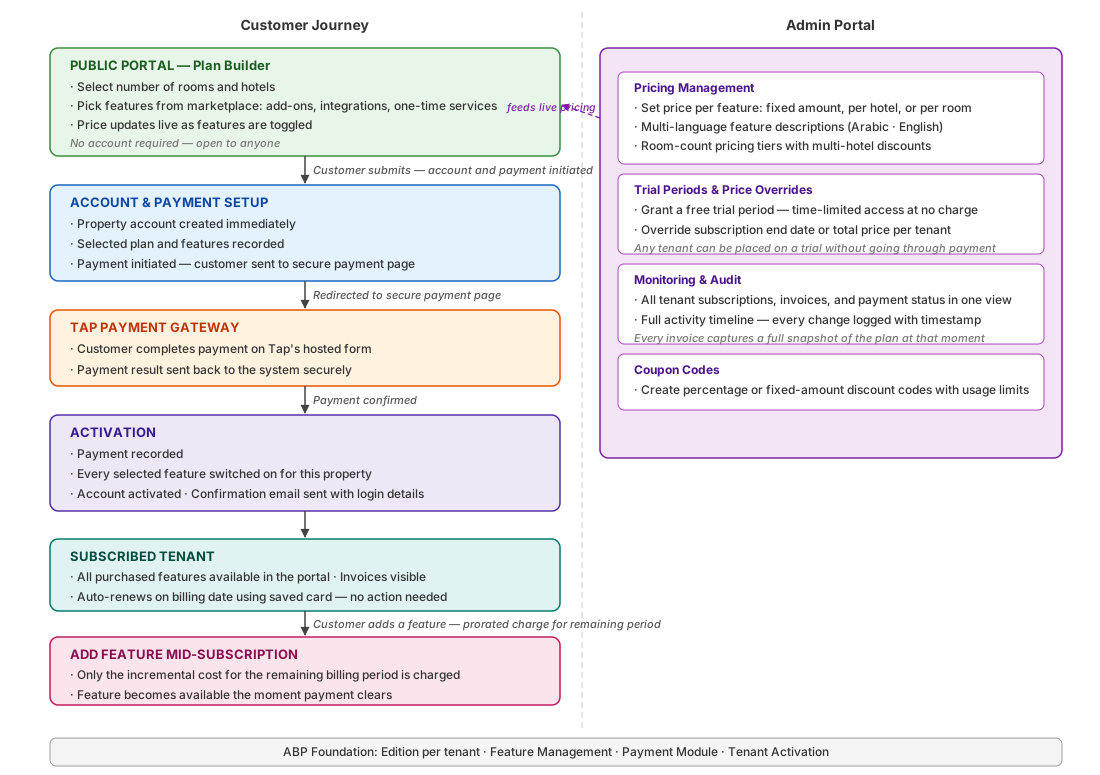
The left side shows the customer journey from the public portal through to an active subscription and mid-period feature additions. The right side shows what the admin portal manages. Everything runs on the ABP foundation shown at the bottom.
What the Customer Sees — The Public Portal
A prospective customer lands on the public pricing page. No account, no login — just a form.
They start by entering how many rooms and how many hotels they have. That selection feeds a room tier pricing rule that computes the base price per hotel with a discount applied for each additional hotel beyond the first.
Below that is a feature marketplace. Features are grouped into three categories:
- Add-ons — Channel Manager, Dynamic Pricing, POS, Website, Guest Mobile App, Accounting
- Integrations — Ministry of Tourism, Shomoos, ZATCA
- One-time Services — Training, Data Import, Setup
Each feature has a price (fixed, per hotel, or per room), a description in both Arabic and English, and can be toggled individually. As the customer selects and deselects, the total price updates live. There is no “choose a plan” step — the plan is whatever the customer builds.
At the bottom, they enter their property details, admin credentials, agree to terms, and pay. The entire registration and subscription happen in one flow.
What Happens Beneath That Form
When the customer hits submit, the system handles the rest in a single flow — no manual steps, no waiting for an admin to configure anything.
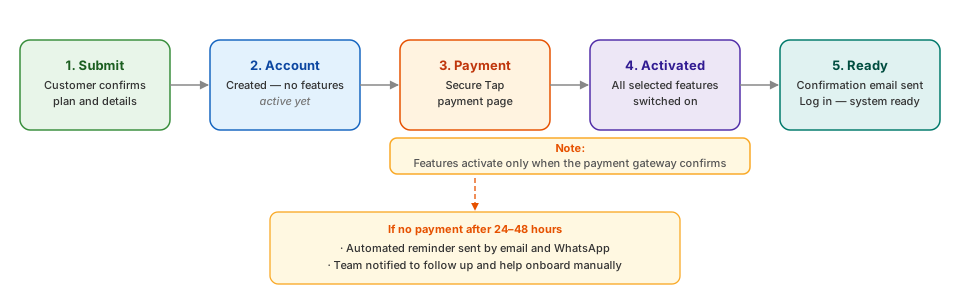
The account is provisioned the moment they submit. They are redirected to Tap’s secure payment page. The instant payment clears, every feature they selected is automatically switched on. A confirmation email arrives with their login details. They log in and their system is ready.
Why create the account before payment clears?
Our R&D found consistent advice across Stack Overflow, Reddit, and SaaS developer communities: create the tenant minimally upfront, but hold back feature access until the payment webhook confirms success. The webhook is the only reliable signal — a redirect back from the payment page can be faked or dropped, but a server-to-server webhook cannot. So that is exactly what we did. The account exists the moment the form is submitted, but with no active features. Everything unlocks only after Tap confirms the charge.
A side benefit: incomplete signups become trackable. If a customer creates an account but never completes payment, the system knows. After 24–48 hours without confirmation, an automated reminder goes out by email and WhatsApp. The team is also notified to follow up and help onboard manually if needed — no signup falls through the cracks.
What if payment fails?
The account already exists, so the customer cannot re-register from the public site — it would show a validation error since their email or phone is already taken. Instead, they log in to the portal and retry directly from their invoice list. The support team can also step in from the admin side if needed.
What about abuse?
Our R&D flagged the risk early: an open public form with no account requirement could be flooded with fake signups. The decision was to keep the flow frictionless and respond only if abuse is actually detected. CAPTCHA and per-IP or per-email rate limits are designed and ready to switch on — but off by default. Adding friction to every genuine customer to guard against a hypothetical bot attack did not feel like the right trade-off.
The Pricing Layer — How Features Get Their Price
ABP’s feature system knows which features exist and whether they are enabled for a tenant. It does not know what they cost.
A feature pricing table acts as the bridge. It stores one row per ABP feature with the price, the pricing unit (fixed amount, per hotel, or per room), and translations in Arabic and English. The admin portal manages these rows. The public portal reads them via an unauthenticated endpoint to populate the marketplace and calculate live prices.
For the room-based base price, a separate room tier pricing table holds tier brackets — for example, 1–5 rooms at one rate, 6–20 rooms at another — with a configurable discount percentage applied for each hotel beyond the first. The pricing engine combines the room tier price, feature prices, and VAT to produce the final total.
This separation means pricing changes require only an admin edit, not a code deployment.
The Admin Portal
The admin portal has three distinct areas for managing subscriptions.
Pricing Management — Admins set and update prices for every feature in the feature pricing table. They can disable a feature entirely (hiding it from the marketplace), mark it as free, and update its multi-language description. The room tier pricing brackets are maintained here too.
Trial Periods and Price Overrides — Any tenant can be granted a trial period from the admin portal. This creates a zero-amount invoice marked as a trial, recording the trial start and end dates. Separately, an admin can override the subscription price or extend the end date for any tenant without changing the underlying plan.
Monitoring and Audit — The admin sees all tenant subscriptions, invoices, payment statuses, and a full activity timeline. Every change — creation, upgrade, downgrade, admin override, trial grant — is recorded in the activity log with a description and timestamp. Each invoice also stores a complete JSON snapshot of the subscription state at the time it was created, so the exact state at any billing event is always reconstructable.
Adding a Feature Mid-Subscription
A customer subscribes in January with three features. In April, they decide to add Channel Manager.
They return to the subscription page, select the new feature, and see the updated price. The system calculates the incremental cost: the difference between their new total and their current total, multiplied by the fraction of the billing period remaining. If 8 months remain in a 12-month subscription, they pay 8/12 of the annual feature price.
A new upgrade invoice is created containing a single line item for the added feature. They pay via Tap. On payment success, the same activation handler runs — IFeatureManager.SetAsync enables the new feature on their Edition — and the tenant’s active feature list is updated.
The customer sees no disruption. Channel Manager appears in their portal the moment payment clears.
Downgrading — removing a feature — follows the same path but creates no charge (prorated refunds are not issued). The feature is removed from the Edition on the next billing cycle.
How ABP’s Feature System Ties It Together
The design decision that makes this work cleanly is Edition-per-tenant, not Edition-as-shared-template.
In a typical ABP SaaS setup, multiple tenants share one Edition and all get the same features. Here, each tenant receives their own Edition created at subscription time. This means IFeatureManager.SetAsync("AddOns.ChannelManager", "true", "E", tenantEditionId) enables that feature only for that one tenant’s Edition, with no risk of affecting anyone else. Changing a tenant’s features is as safe as changing a single row.
The feature definition providers define the full feature catalogue in ABP’s standard way. A custom pricing table is the only addition — it layers pricing metadata onto features ABP already knows about.
What This Unlocks
From the customer’s perspective: they pay for a system sized to their exact operation. A 5-room property pays a 5-room price. A chain with 8 hotels gets a multi-hotel discount automatically. Adding a new module costs the prorated remainder of the year, not a full annual fee.
From the operator’s perspective: every tenant’s configuration is independent, fully audited, and adjustable without code. Pricing changes take effect immediately. Special arrangements are handled through the admin portal without workarounds.
Building this required understanding ABP’s feature and edition system deeply enough to extend it in the right direction rather than around it. Our core principle was to let ABP own what it already does well — feature state, tenant isolation, payment lifecycle — and add only the domain logic that was genuinely missing: pricing, prorated billing, and a self-serve public interface.
Building an MVP or SaaS?
I help startups ship production-ready products with .NET, PostgreSQL, Angular/React, and AI integrations like Model Context Protocol (MCP).